Image
Image is the message template for sending a picture.
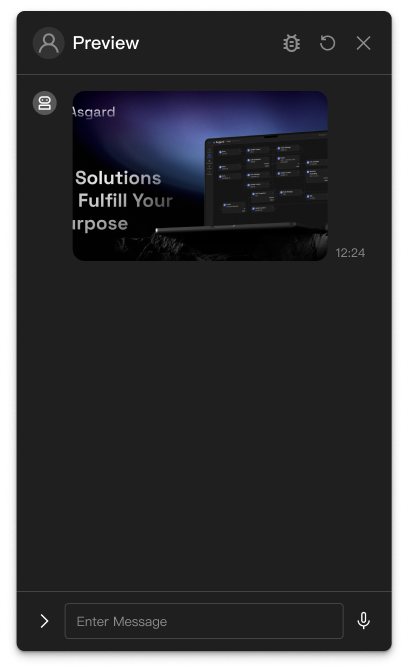
Basic usage
Image shows a picture in the chat interface. Tapping the preview opens the original.
Template structure
JSON
{
  "type": "IMAGE",
  "originalContentUrl": "https://placehold.co/600x400",
  "previewImageUrl": "https://placehold.co/300x200",
  "quickReplies": [
    {
      "text": "See the details"
    }
  ]
}
Properties
type (required)
The message template's type, always "IMAGE".
originalContentUrl (required)
The URL of the original image, shown when the user taps the preview.
previewImageUrl (required)
The URL of the preview image, the thumbnail shown first in the chat interface.
quickReplies (optional)
An array of quick reply buttons. See Quick Replies.
Examples
To send an image from Push Message:
- Choose
Expressionin the Template field's dropdown. - Enter the following JavaScript in the editor.
A plain image message
(() => {
  return {
    type: 'IMAGE',
    originalContentUrl: 'https://example.com/photo.jpg',
    previewImageUrl: 'https://example.com/photo-thumb.jpg',
  };
})()
With quick replies
(() => {
  return {
    type: 'IMAGE',
    originalContentUrl: 'https://example.com/product-image.jpg',
    previewImageUrl: 'https://example.com/product-thumb.jpg',
    quickReplies: [
      {
        text: 'See the details',
      },
      {
        text: 'Buy now',
      },
    ],
  };
})()