Execute Script
Execute Script is the processor that runs custom JavaScript.
Basic usage
Execute Script runs the configured script in the chosen JavaScript engine.
Configuration
The node's property panel:
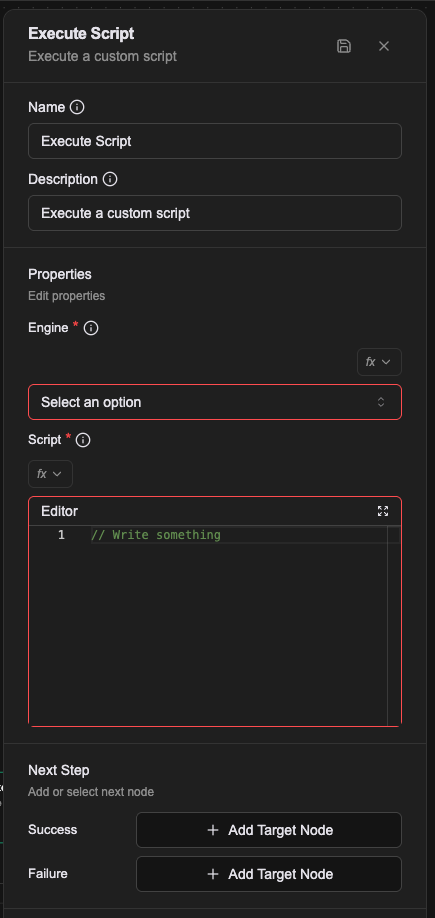
Name
The name shown on the canvas, used to identify this processor within the workflow.
Description
Explains what this processor is for, making the workflow easier to read.
Properties
Engine (required)
The JavaScript engine. Only ECMA5 is supported at present.
Script (required)
The JavaScript to run.
Accessing data
Execute Script exposes a global object named payload holding everything in the workflow:
- the current workflow's payload data
- built-in variables such as
prevMessageandprevPayload
Reading data
Given this data in your workflow:
{
  "user": {
    "name": "Alice",
    "email": "zhang@example.com"
  }
}
read it like this:
// "Alice"
const userName = payload.user.name

// "zhang@example.com"
const userEmail = payload.user.email
Modifying data
You can also modify the payload, and the changes carry into later processors:
// change existing data
payload.user.name = "Bob"

// add data
payload.processedAt = new Date().toISOString()
payload.status = "completed"
Built-in variables
Asgard's built-in variables are reachable through payload:
// the user's last message
const lastMessage = payload.prevMessage

// the previous processor's payload
const previousData = payload.prevPayload

// nested data
const specificValue = payload.prevPayload.someProperty
Limitations
Asgard's built-in functions (history(), vecToStr() and the like) are not available inside Execute Script. Use another processor type when you need them.
In the Workflow CRD
- name: proc-transform
  type: execute-script
  labels:
    display_name: Tidy the query result
  configs:
    - name: engine
      value: javascript
    - name: script
      expression: |-
        (() => {
          return rows.map(r => r.name).join(", ");
        })()
Relationships
Success
Once the script finishes, the workflow continues from this connection point. The script's result is not predictable.
Failure
If the script errors, the workflow continues from this connection point and a prevError variable holds the error.
A worked example
Turn an array from the previous step into one sentence.
| Field | Value |
|---|---|
| Engine | ECMA5 |
| Script | below |
var names = [];
for (var i = 0; i < low_stock.length; i++) {
  names.push(low_stock[i].sku_name);
}
return names.join('、');
That is var and a for loop rather than const and map because the engine is ECMA5.
Notes
- Engine has exactly one valid value,
ECMA5, running on goja. Anything else givesUnknown script engine. - Being ECMA5, post-ES6 syntax is out: no arrow functions, no
let/const, no template literals.