HTTP Request
HTTP Request is the processor that calls an external API over HTTP.
Basic usage
HTTP Request sends a request built from the configured URL, method, headers and body, and stores the response in the httpResponse variable for later processors. Use it for data integration, third-party services, webhooks, external authentication and anything else that talks to another system.
Configuration
The node's property panel:
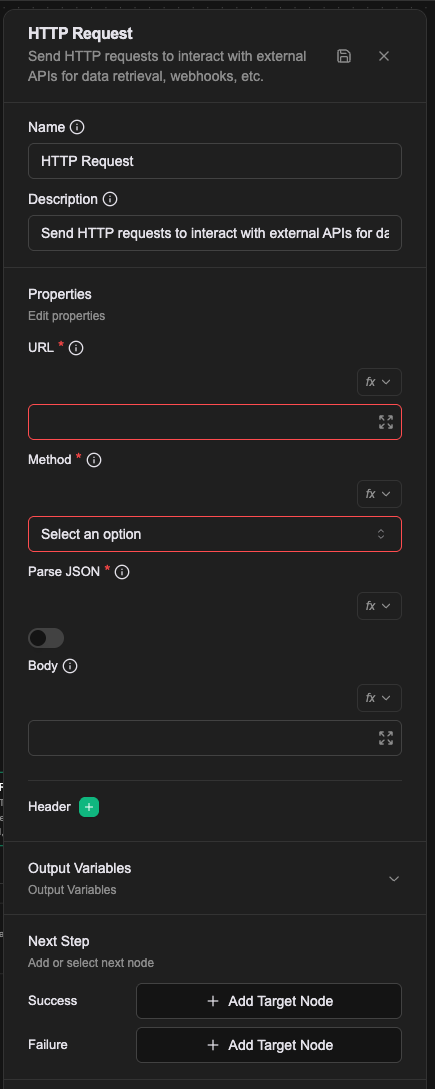
Name
The name shown on the canvas, used to identify this processor within the workflow.
Description
Explains what this processor is for, making the workflow easier to read.
Properties
URL (required)
The address to send the request to. Supports Literal, Expression and Template value types; see Expression introduction — resolving values.
Method (required)
The HTTP method: GET, POST, PUT, DELETE, PATCH and others.
Parse JSON (required)
Whether to parse a JSON response automatically. Off by default. When on, the httpResponse object gains a json field.
Body
The request body, usually for POST and PUT. Supports Literal, Expression and Template value types; see Expression introduction — resolving values.
Header
Additional HTTP request headers. Add as many as you need; Authorization and Content-Type are the common ones.
Underneath, headers are not a separate field. This processor sends every config key that is not url, method, body or parseJson as an HTTP header, using the key itself as the header name. Written as a Workflow CRD:
- name: url
  value: "https://api.sendgrid.com/v3/mail/send"
- name: method
  value: POST
- name: parseJson
  value: "false"
- name: Content-Type
  value: application/json
- name: Authorization
  expression: '"Bearer " + vars.sendgridApiKey'
That also means a header value supports Expression like any other config, so a key can live in a workflow variable and be composed here rather than hardcoded.
Relationships
Success
When the response status is 200, the workflow continues from this connection point. An httpResponse variable is produced with these fields:
| Field | Type | Description |
|---|---|---|
statusCode | number | The HTTP status code |
body | string | The response body as a raw string |
json | object | The parsed JSON object, when Parse JSON is on |
headers | object | The response headers |
Failure
When the request fails (any status other than 200) or a network error occurs, the workflow continues from this connection point and a prevError variable holds the error.
Output: httpResponse
On success the response lands in a variable called httpResponse -- the name is fixed and cannot be changed -- and always has three fields:
| Field | Contents |
|---|---|
httpResponse.statusCode | HTTP status code |
httpResponse.body | The response body, as a raw string |
httpResponse.headers | Response headers |
With Parse JSON on there is a fourth, httpResponse.json, holding the parsed body.
A worked example
Look up one to-do item by the number the user typed, then send back its title.
| Field | Value |
|---|---|
| URL | Expression: 'https://dummyjson.com/todos/' + prevMessage |
| Method | GET |
| Parse JSON | on |
The Push Message after it takes httpResponse.json.todo as an Expression.
For a POST, set Method to POST, build Body with an Expression (JSON.stringify({ name: userName }), say), and add Content-Type: application/json under Header.
Notes
- The URL needs its protocol (
http://orhttps://). - A response status of 400 or above goes to Failure, with the status and body in the error.
- With Parse JSON on, a body that does not parse is not a failure: the node still takes Success, it just leaves
httpResponse.jsonunset. Check for it rather than assuming it is there. - Body and Header both accept Expressions, so flow variables can be carried into the request.