Entry
Entry marks the starting point of a workflow.
Basic usage
When a workflow is triggered, execution begins at an Entry. Every workflow needs at least one.
Configuration
The node's property panel:
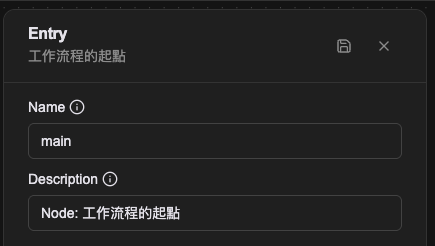
Name
The name shown on the canvas, used to identify this processor within the workflow.
Description
Explains what this processor is for, making the workflow easier to read.
Its shape in the Workflow CRD
Writing the Workflow CRD directly, Entry is not a member of spec.processors but its own top-level field, spec.entries. That is why Entry appears in no processor type list.
spec:
  entries:
    - name: entry-main
      labels:
        display_name: Entry
        description: the entrance an agent calls this tool through
      handlingProcessor: proc-query
      inputSchema: |-
        {
          "type": "object",
          "properties": {}
        }
      tooling:
        name: list_scenario_recommendations
        description: |-
          Lists the recommended equipment models and their categories for three
          store scenarios. Use this when a customer says "I want to open a cafe,
          what equipment do I need".
        allowUploadFile: false
  processors:
    - name: proc-query
      type: query-database
handlingProcessor
Which processor this Entry hands over to, given as that processor's name.
Leaving this line out is a trap you will hit in practice. A workflow can contain a processor and never run it because the entrance is not wired to it, and both helm lint and helm template still pass, because they validate YAML and template syntax rather than whether the graph is connected. Rendering successfully is not the same as the flow working.
inputSchema
A JSON Schema string defining the parameters this entrance accepts. When an Automation Tool is called by an agent, this schema is what the agent builds its parameters from.
Restricting an agent to particular values is the job of the schema's own required and enum, not of wording inside description:
{
  "type": "object",
  "required": ["consumer_type", "action_type", "subject_id"],
  "properties": {
    "consumer_type": {
      "type": "string",
      "enum": ["inventory", "order", "product"]
    }
  }
}
A constraint written into a description while the field itself stays open is not a constraint. Validation happens at the field level.
tooling
Exposes this entrance as a tool an agent can call: the tool's name, the description the agent reads, and whether file upload is allowed (allowUploadFile).
How the description is written decides whether the agent calls the tool at the right moment, so in practice it states the situation too, for example "use this when a customer says they want to open a cafe and asks what equipment they need".
Whether a tool needs the user's consent before running is configured at the Toolset level, not here.
Relationships
Outgoing connection
Entry has only an outgoing connection, leading to the next processor to run.
Examples
A single Entry
The simplest structure: start at Entry, send a message, then wait for the user.
Several Entries
One workflow can have several Entries for different trigger situations. Here the main entrance initializes system state, while the other drops straight into conversation mode. Both paths converge on Listen Message. This suits a workflow that has to support more than one way of starting.
Notes
- A workflow needs at least one Entry and may have several.
- Entry is not a processor. It is the Workflow CRD's
spec.entries, and on the canvas it is themainnode. Its property panel has only Name and Description; thehandlingProcessor,inputSchemaandtoolingdescribed below exist only in the CRD and are nowhere on screen.