Listen Message
Listen Message is the processor that waits for and receives a message from the user.
Basic usage
When Listen Message runs, the workflow pauses until the user sends a message. The content is stored in variables for later processors, and execution continues to the next processor.
Configuration
The node's property panel:
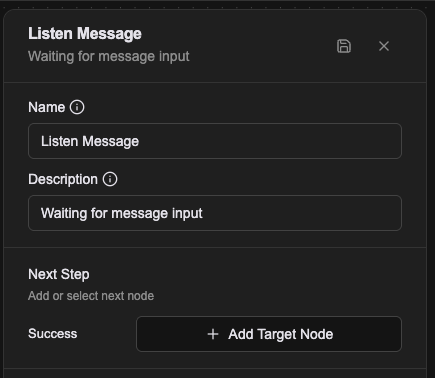
Name
The name shown on the canvas, used to identify this processor within the workflow.
Description
Explains what this processor is for, making the workflow easier to read.
Output variables
Receiving a message produces these variables for later processors:
prevMessage
The text the user sent (type: string).
prevBlobs
If the user uploaded files, their details are stored in this array (type: Blob[]). Each Blob carries blobId, fileType, fileName, size and mime.
In the Workflow CRD
Listen Message has no settings at all, so configs is an empty array.
- name: proc-listen
  type: listen-message
  labels:
    display_name: Listen Message
  configs: []
It has one relationship, success, and no failure branch.
Relationships
Success
Once a message has been received, the workflow continues from this connection point to the next processor.
A worked example
The smallest echo there is: Listen Message takes the input, and a Push Message after it sends prevMessage straight back.
Listen Message itself has nothing to fill in. What arrives lands in prevMessage, and any attached files in prevBlobs.
Notes
- The flow stops at this node and stays stopped until the user sends something.
- Every pass through overwrites
prevMessageandprevBlobswith this turn's input. - Files the user uploads are held by the platform; later nodes reach them through
blobId.