Push Message
Push Message is the processor that sends a message back to the user.
Basic usage
Push Message sends the configured message immediately, then continues to the next processor.
Configuration
The node's property panel:
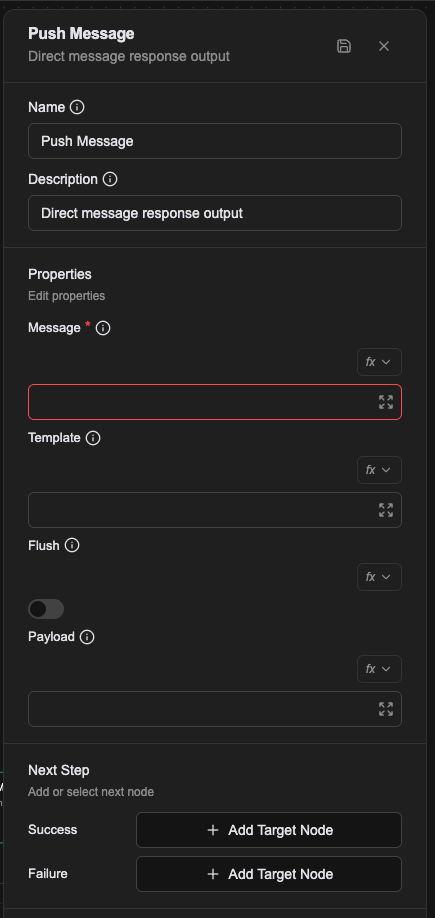
Name
The name shown on the canvas, used to identify this processor within the workflow.
Description
Explains what this processor is for, making the workflow easier to read.
Properties
Message (required)
The text to send to the user. Supports Literal, Expression and Template value types; see Expression introduction — resolving values.
Template
The message template, defining how the message is presented. Use it for richer formats such as buttons, images and quick replies.
Flush
Whether to flush the reply buffer immediately. Defaults to false.
The reply buffer accumulates messages from several Push Message nodes — Push Message 1, Push Message 2, Push Message 3 and so on — and only flushes once the turn completes, as in this diagram:
| Value | Behaviour | Suits |
|---|---|---|
| false | Accumulates every intermediate message and flushes only at the end of the turn | Default conversational behaviour, and third-party chat platforms (LINE, Discord) |
| true | Flushes the buffer on every intermediate message | Custom SDK interfaces that need immediate visual feedback |
Note: third-party chat platforms differ in how their reply tokens work, so turning this on may break behaviour there. Check the platform's own documentation.
Payload
Additional structured data (metadata, for instance) to push alongside the message, for the frontend to use.
In the Workflow CRD
- name: proc-push-error-msg
  type: push-message
  labels:
    display_name: Push Error Message
  configs:
    - name: message
      value: The system is busy, please try again shortly.
    - name: flush
      value: "false"
    - name: template
      expression: |-
        (() => {
          return { type: "HINT" };
        })()
    - name: payload
      expression: |-
        ({ prevError })
flush is a boolean, but in the CRD it is always written as the string "true" or "false".
Automation Tool workflows also use type: push-message, but there it accepts only payload and plays the part of Response.
Relationships
Success
Once the message has been sent, the workflow continues from this connection point to the next processor.
Failure
If sending fails, the workflow continues from this connection point and a prevError variable holds the error.
A worked example
Report back what the previous node found.
| Field | Value |
|---|---|
| Message | Expression: low_stock.length + ' items are low on stock' |
| Flush | off |
Message can also be written in Template mode to produce a richer message with buttons or images.
Notes
- Message supports both Expression and Template, and either can reference any variable already set in the flow.
- Flush is a toggle deciding whether this message goes out immediately.