Generate Embedding
Generate Embedding is the processor that turns text into a vector representation.
Basic usage
Generate Embedding uses the chosen Embedding Model to convert input text into a numeric vector, for semantic search, similarity scoring, document classification and anything else that needs vectors. The result is stored as an array of floats in the variable you name, ready for later processors.
Configuration
The node's property panel:
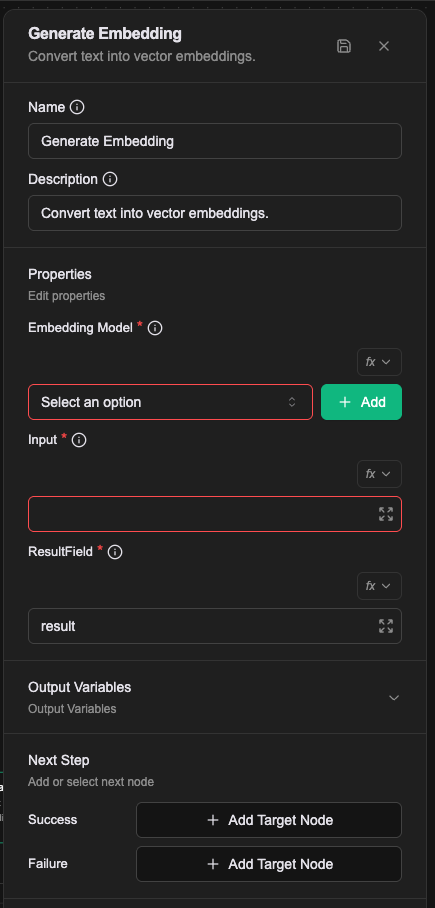
Name
The name shown on the canvas, used to identify this processor within the workflow.
Description
Explains what this processor is for, making the workflow easier to read.
Properties
Embedding Model (required)
The name of the Embedding Model resource to use. The resource has to exist first. Various pre-trained embedding models are supported, including OpenAI's text-embedding family.
Input (required)
The text to convert. Supports Literal, Expression and Template value types; see Expression introduction — resolving values.
Result Field (required)
The variable that receives the vector. The result, an array of floats, is stored in the context payload field of that name.
In the Workflow CRD
- name: proc-embed
  type: generate-embedding
  labels:
    display_name: Embed the user's question
  configs:
    - name: embeddingModel
      value: em-builtin
    - name: input
      expression: prevMessage
    - name: resultField
      value: result
resultField defaults to result. The other two have no default and must be filled in.
Relationships
Success
Once the vector has been produced, the workflow continues from this connection point. The result is stored as an array of floats in the variable named by Result Field, available to later processors.
Failure
If the conversion errors, the workflow continues from this connection point and a prevError variable holds the error.
A worked example
Turn the user's input into a vector, then use it to search a knowledge base.
| Field | Value |
|---|---|
| Embedding Model | an Embedding Model configured in the project |
| Input | Expression: prevMessage |
| ResultField | query_vector |
Afterwards query_vector holds an array of numbers (Array[Number]). ResultField names the variable; it defaults to result.
Notes
- Different Embedding Models produce vectors of different dimensions, so vectors made before a model change cannot be compared with ones made after.
- A vector is only meaningful against other vectors from the same model.
- Models cap their input length, so long text has to be split up first.