Retrieve Knowledge
Retrieve Knowledge is the processor that searches a knowledge base for relevant material.
Basic usage
Retrieve Knowledge runs a semantic search over the chosen knowledge bases using the query text, filters the results by a similarity threshold, and stores what matches as an array in the variable you name, ready for later processors. Use it for question answering, document retrieval, content recommendation, support and anything else that needs accurate information grounded in a knowledge base.
Configuration
The node's property panel:
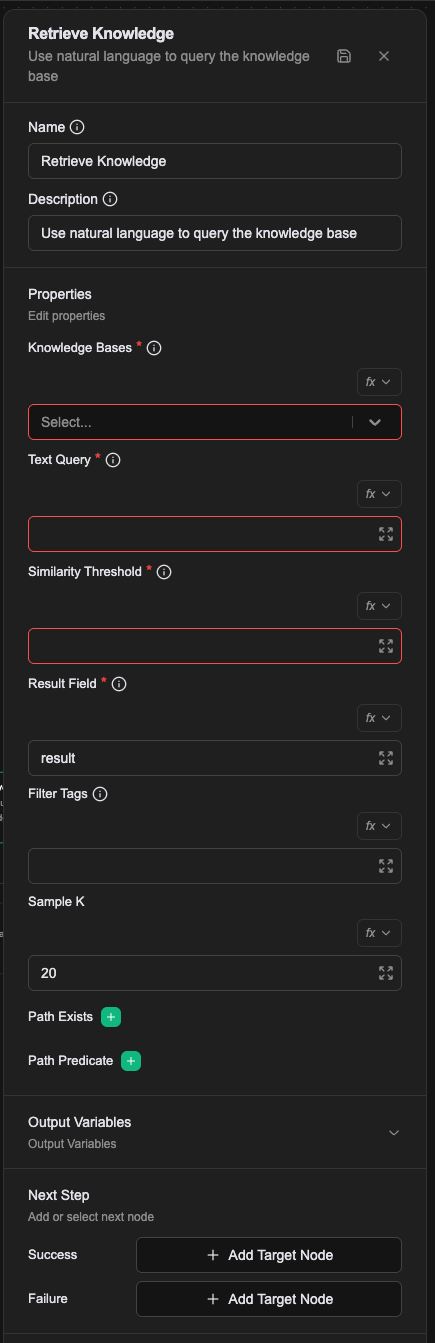
Name
The name shown on the canvas, used to identify this processor within the workflow.
Description
Explains what this processor is for, making the workflow easier to read.
Properties
Knowledge Bases (required)
Which knowledge bases to search, as a comma-separated list of KnowledgeBase names. Several can be searched at once. The knowledge bases must exist and have data imported first.
Text Query (required)
The text to search with. Supports Literal, Expression and Template value types; see Expression introduction — resolving values.
Similarity Threshold (required)
The similarity cutoff for filtering results, between 0 and 1. 1 means most similar; the lower the number, the looser the match. Values between 0.1 and 0.7 are typical.
Result Field (required)
The variable that receives the results, stored as an array. Defaults to result.
Filter Tags
Tags to filter results by, as a comma-separated list. Filters further using the tags in the knowledge base.
Sample K
How many entries to sample from the indexed data and its enrichments. Defaults to 20, and controls the breadth of sampling during retrieval.
Path Exists
Checks whether a field at the given JSON path exists. Takes valid JSON Path syntax, and filters for data with a particular structure. Several path checks can be configured.
For more on JSON Path syntax, see the JSONPath specification.
Path Predicate
Filters using a JSON Path predicate, given as valid predicate syntax (for example $.category == "HR"). Several predicates are combined with AND.
In the Workflow CRD
- name: proc-retrieve
  type: retrieve-knowledge
  labels:
    display_name: Search the product knowledge base
  configs:
    - name: knowledgeBases
      value: kb-product-manual,kb-faq
    - name: textQuery
      expression: prevMessage
    - name: similarityThreshold
      value: "0.7"
    - name: resultField
      value: result
    - name: sampleK
      value: "20"
    - name: filterTags
      value: public
knowledgeBases and filterTags are comma-separated strings, not arrays. resultField defaults to result and sampleK to 20.
This processor accepts dynamic config, which is how the editor's Path Exists and Path Predicate are added.
Relationships
Success
Once results are retrieved, the workflow continues from this connection point. They are stored as an array in the variable named by Result Field, available to later processors.
Failure
If retrieval errors, the workflow continues from this connection point and a prevError variable holds the error.
A worked example
Search the knowledge base with the user's own question.
| Field | Value |
|---|---|
| Knowledge Bases | the project's knowledge bases (more than one allowed) |
| Text Query | Expression: prevMessage |
| Similarity Threshold | 0.7 |
| Result Field | kb_hits |
| Sample K | 5 |
Afterwards kb_hits holds an object. Result Field names the variable; it defaults to result. What usually follows is an LLM Completion that folds the retrieved passages into its Prompt.
Notes
- Similarity Threshold is required and decides which passages come back. Too high and you miss things, too low and you get noise; it depends on what is in the knowledge base.
- Sample K caps how many passages come back.
- Filter Tags restricts the search to documents carrying particular tags.