Router
Router is the processor that decides which path a workflow takes, based on conditions.
Basic usage
Router checks its conditions in order. The first branch that evaluates to true is taken, and if none match, execution follows the Else branch.
Configuration
The node's property panel:
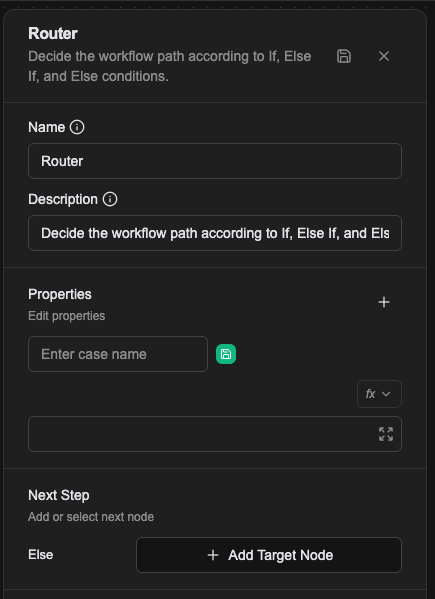
Name
The name shown on the canvas, used to identify this processor within the workflow.
Description
Explains what this processor is for, making the workflow easier to read.
Properties
You can add as many condition branches as you need. Each carries a name and a condition.
Value types
- Literal: enter
trueorfalsedirectly - Expression: evaluate the condition with a JavaScript expression
- Template: evaluate the condition with template syntax
For how values are resolved, see Expression introduction — resolving values.
In the Workflow CRD
Each branch is one config, named case-1, case-2 and so on, whose value is that branch's condition. The branch name is also the relationship name, so adding a case adds both a setting and an outgoing edge.
- name: proc-route
  type: router
  labels:
    display_name: Is this a return enquiry
  configs:
    - name: case-1
      expression: |-
        (() => {
          return /return|refund/.test(prevMessage);
        })()
    - name: case-2
      expression: |-
        (() => {
          return /shipping|delivery/.test(prevMessage);
        })()
The default relationships are case-1 and else. else takes no condition and is followed when no case holds.
Relationships
Dynamic branches
A connection point is created for each condition configured in Properties. When a condition evaluates to true, the workflow continues from that branch.
Else
When no dynamic condition matches, the workflow continues from this connection point, which acts as the default path.
A worked example
Decide whether to raise a restock notice based on a stock query. Press + under Properties to add one case:
| Case name | Condition |
|---|---|
need_restock | Expression: low_stock.length > 0 |
A branch called need_restock appears on the node, which together with the built-in Else gives it two exits. The condition has to return a boolean.
How the conditions are evaluated
Router walks the cases in the order they were added. The first one that holds wins and evaluation stops; the cases after it are never looked at. Only if none hold does the flow take Else.
A value is not simply truthy or falsy:
- A boolean is used as-is.
- A string is parsed with
strconv.ParseBool, sotrue,false,1,0,t,fwork. A string it cannot parse goes to Failure, it is not treated as false. - Anything that is neither a boolean nor a string -- an object, a number, null -- goes to Failure.
This catches people out: a condition whose expression returns a non-boolean does not quietly fall through to Else, it fails the node.