Stream LLM Completion
Stream LLM Completion calls a large language model and streams natural language output.
Basic usage
Stream LLM Completion sends the configured prompt to the chosen Completion Model, and the response appears token by token as it is produced, like someone typing. Message output is built in, so no separate Push Message is needed. Use it for AI chatbots, live support replies, interactive question answering and anywhere a natural conversational feel matters.
Configuration
The node's property panel:
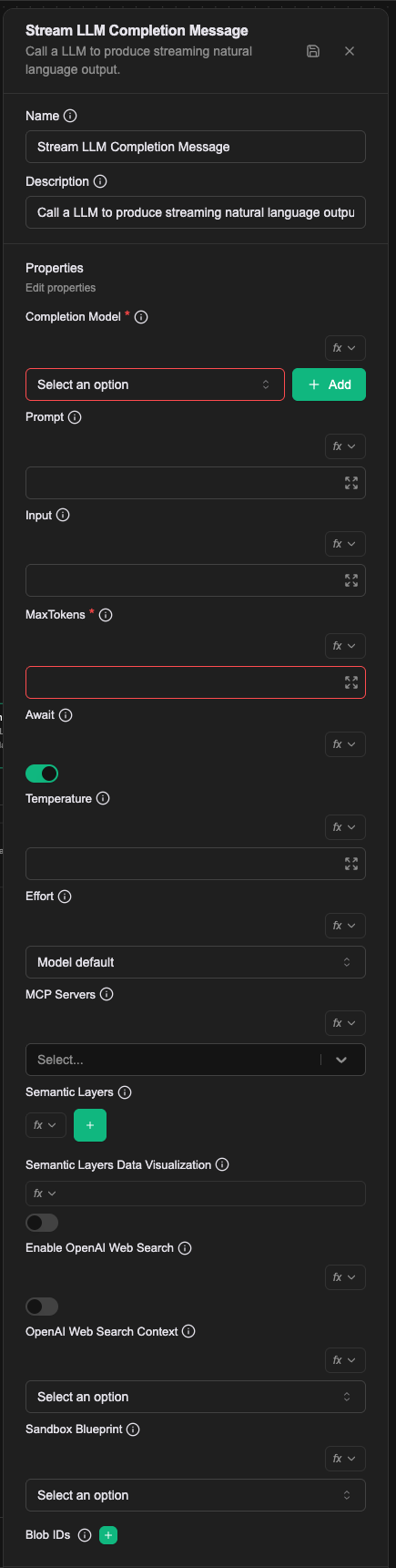
Name
The name shown on the canvas, used to identify this processor within the workflow.
Description
Explains what this processor is for, making the workflow easier to read.
Properties
Completion Model (required)
The name of the Completion Model resource to use. The resource has to exist first. OpenAI GPT, Claude and Gemini models are supported, among others.
Prompt (required)
The prompt sent to the model, supplying context and whatever memory is needed.
Value types
- Literal: enter the prompt directly
- Expression: build the prompt with a JavaScript expression
- Template: compose the prompt with template syntax and built-in functions
For how values are resolved, see Expression introduction — resolving values.
Input
The user message for this turn. Left empty, the processor uses the message the channel delivered, that is prevMessage from the context.
An ordinary conversation does not need this field: let it use what the user actually said. You override it when the input has been worked on first, for example after prepending a summary of earlier turns or rewriting the question more explicitly.
MaxTokens (required)
The maximum tokens for prompt plus response, which controls both response length and cost.
Await
Whether the workflow waits for the model to finish before continuing. On, it waits for the complete response; off, it continues as soon as the model emits its first token.
Temperature
(Optional) The model's temperature, controlling how random the answer is. Higher means more varied, lower means more consistent. The allowed range differs by completion model, so use that model's limits. Omitted, the model's default applies. Note that some models do not support temperature at all; do not set this field for those.
Effort
Reasoning effort: low, medium, high, xhigh, max, or auto to leave it to the model. It controls both thinking depth and overall token spend.
Unset, the model's default applies. Not every model supports every level, and sending an unsupported one fails the turn. Some models — the fast, Haiku-tier ones in particular — do not accept the parameter at all; for those, set disabled so the field is not sent.
MCP Servers
(Optional) The toolsets the model may use, chosen from the dropdown. Configuring toolsets gives the model every tool within them. In most cases it is also worth describing in the prompt when each tool should be called, so the model chooses correctly.
Displayed as MCP Servers in the editor; the config key when writing the Workflow CRD is toolsets.
Enable OpenAI Web Search
(Optional) Whether to enable OpenAI Web Search. Only for OpenAI models that support it. Once on, the model can search the web to answer. (See the OpenAI documentation.)
OpenAI Web Search Context
(Optional) How much content is retrieved from the web to help produce the response: 'low', 'medium' or 'high'. Only configurable when Enable OpenAI Web Search is on.
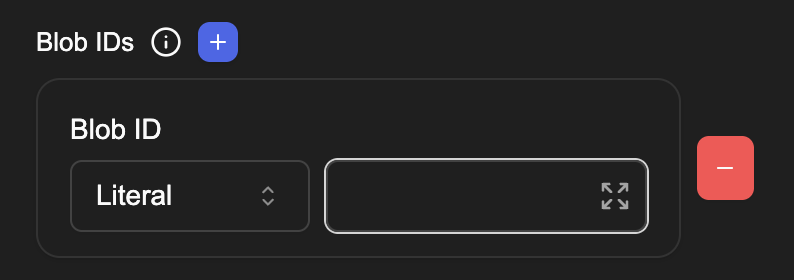
Blob IDs
The ids of images or files for the model to analyse. Click (+) to add several. Available only with a Completion Model that supports vision. The model analyses this content and answers from it.
Semantic Layers
A JSON array of the semantic layers to attach to the model. Each element has this shape:
[
  {
    "name": "<CR name>",
    "allowQuery": true,
    "allowWrite": false,
    "allowedCubes": ["orders", "order_items"]
  }
]
Compared with the singular Semantic Layer below, this field attaches several layers at once, letting one LLM call query across several databases. Use this field in new workflows.
Semantic Layers Data Visualization
Off by default. Once on, and provided at least one semantic layer is configured, the model gains two extra tools — show_result_set_table and show_vega_visualization — for rendering the most recent query result as a UI table or a Vega v5 chart.
This is opt-in. Without it, query results come back as text only.
Sandbox Blueprint
The name of a SandboxBlueprint to materialize a sandbox for this LLM call. Once set, the system makes sure the sandbox is Ready before dispatching the task, and the model gains the sandbox-bound builtin tools (bash, str_replace_editor) plus whatever Skills are discovered in the system prompt.
Leave it blank to run the call without a sandbox.
In the Workflow CRD
- name: proc-agent-stream-msg
  type: stream-llm-completion-message
  labels:
    display_name: Agent
    description: The commerce manager's main reply
  configs:
    - name: completionModel
      value: cm-builtin-balanced
    - name: prompt
      template: |
        You are the commerce manager, an AI agent working alongside an e-commerce operations team.
        {{#if prevPayload.brand}}
        The brand in scope is {{{prevPayload.brand.display_name}}}.
        {{/if}}
    - name: maxTokens
      value: "60000"
    - name: await
      value: "true"
    - name: toolsets
      value: "ts-ui-event"
    - name: sandboxBlueprint
      value: "sbp-ec-manager"
prompt is the system prompt and persona, stable across turns. It does not carry the user's message or the conversation history; that is input's job. Written as a template, it can use Handlebars conditionals to build a different persona from the payload.
toolsets is the field the editor shows as MCP Servers, and its value is a comma-separated list of Toolset names.
Relationships
Success
- Await on: the workflow continues from this connection point once the model has produced the complete response
- Await off: the workflow continues as soon as the model emits its first token
Failure
If the model call fails, the workflow continues from this connection point and a prevError variable holds the error.
A worked example
An ordinary conversational reply: sit after a Listen Message, hand the user's text to the model, stream the answer straight back.
| Field | Value |
|---|---|
| Completion Model | a model configured in the project |
| Prompt | a system prompt, e.g. You are a support assistant. Keep answers short. |
| Input | Expression: prevMessage |
| MaxTokens | 1024 |
| Await | off |
With Await off the flow continues as soon as the reply is sent. Turn it on when something has to happen after the reply finishes, such as writing it to a database.
Notes
- This processor sends the reply to the user itself; there is no need for a Push Message after it.
- The reply streams out token by token rather than appearing once generation finishes.
Awaitdecides whether the flow waits for the whole reply: on, later nodes see the complete text; off, the flow moves on first.