Usage Reports
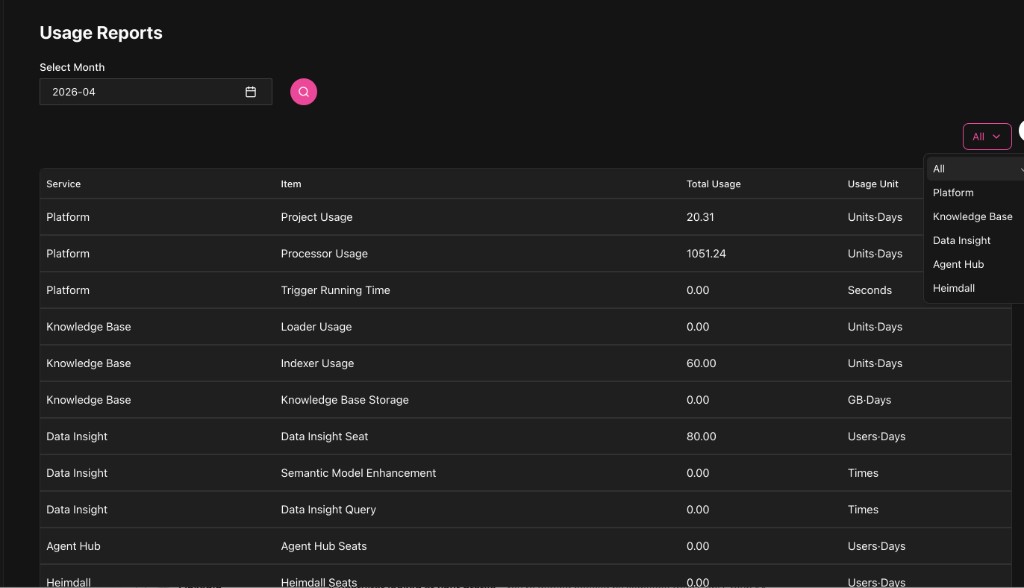
Usage Reports shows the usage detail for a month you choose, and can be filtered by service category (Platform, Knowledge Base, Data Insight, Agent Hub, Heimdall and so on; the actual categories are whatever the page shows).
Choosing the month
Select Month at the top left picks the month, and the search button updates the list.
Filtering by service
On the right there is usually a service filter dropdown: All, Platform, Knowledge Base, Data Insight, Agent Hub, Heimdall.
Use it to look at one class of resource at a time, which is what makes attributing and reducing cost practical.
Reading the table
The usual columns:
- Service: the service the usage belongs to
- Item: the charged item, for example Seat, Query or Usage
- Total Usage
- Usage Unit: for example Units·Days, Times, GB·Days
Next
- For cost trends and the cost breakdown, go to Overview.
- To compare against bills and invoices, go to Billing Reports.